
ChatKit Is Source-Available: Self-Host the Chatbot Builder for Chatwoot
By ThinkCloud
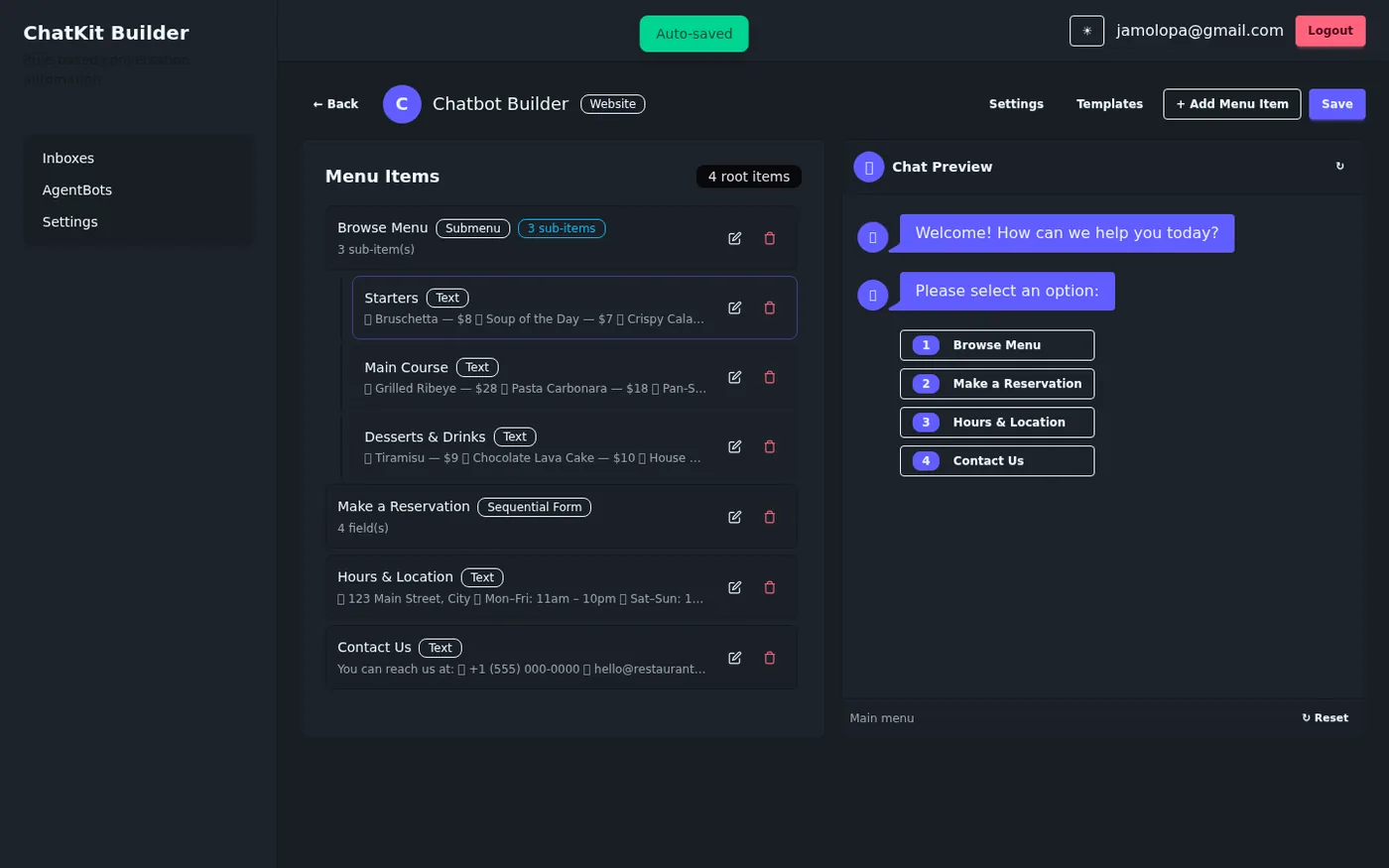
ChatKit is source-available. The code and ready-made Docker images are public on GitHub at github.com/wannaco/chatkit, and you can run it for your own organisation for free, commercially or not, at any size.
ChatKit is a visual chatbot builder for Chatwoot. If you already run Chatwoot, you can have menu bots on your website chat, WhatsApp and Telegram inboxes the same day.
What ChatKit does
ChatKit is a visual chatbot builder that plugs into Chatwoot as an agent bot. Every conversation stays in your Chatwoot inbox, next to your human agents. You design the flow; ChatKit runs it.
- Greetings and menus: numbered menus and submenus, built in a visual editor with a live chat preview
- Keywords: “menu”, “back”, “agent” or your own words to navigate or reach a person
- Forms: ask a few questions in a row; the answers are saved on the Chatwoot contact and conversation, and can be sent to your CRM
- Agent hand-off: pass the conversation to a human, with labels and team assignment
- Follow-ups: a reminder when a customer goes quiet
- One flow per inbox: each Chatwoot inbox (website, WhatsApp, Telegram) gets its own menu
What’s in the release
- Public source and prebuilt images. Three small containers (builder, bot service and a PocketBase database), published to the GitHub Container Registry on every change. Nothing to compile.
- Deployment files for three setups: next to an existing Chatwoot, behind a platform like Dokploy or Traefik, or a full Chatwoot + ChatKit server from scratch.
- One domain, one entry point. The builder, its API and the Chatwoot webhooks all live behind a single HTTPS domain.
- Security hardening for a public release:
- your Chatwoot access token is encrypted at rest with AES-256-GCM, using a key that only exists on your server
- the token is write-only in the builder
- only logged-in builder users can act on your Chatwoot account, and there is no public sign-up
- optional signed webhook URLs reject forged events
- A deployment guide covering each setup, backups, restores and updates.
How to deploy it
You need a Linux server with Docker, and a domain (for example chatkit.yourcompany.com) pointed at it.
Option 1: You already have Chatwoot
This works with a self-hosted Chatwoot or Chatwoot Cloud. The bundled Caddy gets the HTTPS certificate for you.
git clone https://github.com/wannaco/chatkit.git
cd chatkit/deploy
cp .env.example .env
nano .env               # DOMAIN, PB_ADMIN_EMAIL, PB_ADMIN_PASSWORD
                        # ENCRYPTION_KEY:  openssl rand -hex 32
                        # WEBHOOK_SECRET:  openssl rand -hex 24
docker compose up -d
Option 2: Behind Dokploy, Traefik or Coolify
If something already owns ports 80 and 443, use deploy/docker-compose.traefik.yml instead. In Dokploy, create a Compose app from the repository, set the compose path to deploy/docker-compose.traefik.yml, add the same environment variables, and point your domain at the builder-ui service on port 80. That’s how our own demo runs.
Option 3: Chatwoot and ChatKit together
Starting from nothing? deploy/docker-compose.full.yml installs Chatwoot (Rails, Sidekiq, Postgres and Redis) and ChatKit on one server. It needs two domains, one for each, with automatic HTTPS for both. It also prepares the Chatwoot database on first start.
cp .env.full.example .env    # fill in every CHANGE_ME
docker compose -f docker-compose.full.yml up -d
Then connect Chatwoot
- Open your ChatKit domain and log in with the admin email and password from
.env. - In Chatwoot, copy an administrator’s access token from Profile settings, and note your account ID (the number in
/app/accounts/<id>/). - In ChatKit, enter the Chatwoot URL, account ID and token under Settings.
- Under Inboxes, create a menu for one of your Chatwoot inboxes and design the flow.
- Create an agent bot and assign it to the inbox. ChatKit points the bot’s webhook at itself, secret included.
- Send a message to that inbox. The greeting and menu should come straight back.
The full guide covers adding more builder users, nightly backups, restores, pinning a version and troubleshooting.
Free for internal use
ChatKit is source-available under the PolyForm Internal Use License. In practice:
- Free to self-host, modify and run for your own organisation’s customer conversations, commercially or not, at any size
- Not allowed without a commercial license: reselling it, hosting it for other companies (for example, an agency running it for clients), or bundling it into a product you sell
It’s the same model as our Shared Mailbox and GWS Manager. The code is public so you can audit it and run it yourself, and commercial rights stay with us. If you need a commercial license, get in touch.
Want a hand deploying it?
Most teams can follow the guide above. If you’d like an experienced hand, we offer deployment consulting: we help you set ChatKit up on your own server and domain, connect it to your Chatwoot, WhatsApp and Telegram inboxes, and build your first menus and forms with you. After that, it’s yours to run.
Book a free 15-minute call and we’ll tell you what your setup would involve.